JPEG, PNG, WebP or AVIF: Which Image Format Should You Use?
What each web image format is good at, when transparency or animation matters, and simple rules for choosing between JPEG, PNG, WebP and AVIF.
Every image on a web page is stored in some format, and the choice quietly affects file size, sharpness, transparency and compatibility. Most people never choose deliberately; they keep whatever the camera, screenshot tool or design app produced. That works until a page feels slow or a logo comes out with a white box around it. This guide explains what JPEG, PNG, WebP and AVIF are each built for, and gives rules for picking one.
The two things that separate formats
Two properties do most of the sorting.
The first is lossy versus lossless. A lossy format throws away detail the eye is unlikely to miss, which makes files much smaller but cannot be undone. A lossless format keeps every pixel exactly, at the cost of larger files. If the difference is new to you, lossy vs lossless image compression covers it in depth.
The second is transparency. Some formats can store an alpha channel, meaning each pixel can be fully or partly see-through. Others cannot, and anything transparent gets filled with a solid colour when saved.
JPEG: the default for photographs
JPEG is lossy. It splits the image into 8x8 pixel blocks and simplifies the detail in each one, using a quality setting to decide how aggressively. Smooth gradients, skin tones and out-of-focus backgrounds compress very well, which is why JPEG has been the standard for photographs for decades.
Its weaknesses are the mirror image of its strengths. Hard edges, text and flat colours can pick up ringing and blocky artefacts at lower quality. JPEG has no alpha channel, so it cannot hold a transparent background. And every time you open, edit and re-save a JPEG you lose a little more, so keep an original and export from that.
Every browser, email client, phone and printer understands JPEG. That universality is its main advantage over newer formats.
PNG: exact pixels and transparency
PNG is lossless and supports an alpha channel. It is the right choice for logos, icons, screenshots, diagrams, interface mock-ups and anything with sharp text or large areas of flat colour. Those images compress well losslessly because they contain repeating patterns.
PNG is a poor choice for photographs. A photo has noise and subtle variation in almost every pixel, so a lossless file can be several times larger than a good JPEG of the same picture. If a photo is heavy, saving it as PNG is a common cause.
WebP: one format for photos and graphics
WebP can be lossy or lossless, and it supports transparency in both modes. That makes it a single format that can stand in for both JPEG and PNG. It also supports animation, which puts it in the territory of GIF. Lossy WebP is often noticeably smaller than JPEG at similar visual quality, though the exact saving depends on the image.
Browser support is now very broad across current versions of the major browsers. Support in other software is less uniform: some older editors, email clients and upload forms still reject WebP files, so check where the file is going.
AVIF: smallest files, more caveats
AVIF is based on a video codec and can also be lossy or lossless, with transparency. For photographs it can produce smaller files than WebP at comparable quality. The trade-offs are that encoding is slower and more demanding, and support for creating and reading AVIF is still less universal than for WebP or JPEG. Current major browsers can display it, but always check the browsers and tools you actually need to support.
Comparing the four
| Format | Compression | Transparency | Animation | Best for |
|---|---|---|---|---|
| JPEG | Lossy | No | No | Photos, maximum compatibility |
| PNG | Lossless | Yes | Not in common use | Logos, screenshots, sharp graphics |
| WebP | Lossy or lossless | Yes | Yes | General web use, photos and graphics |
| AVIF | Lossy or lossless | Yes | Yes | Photos where the smallest size matters |
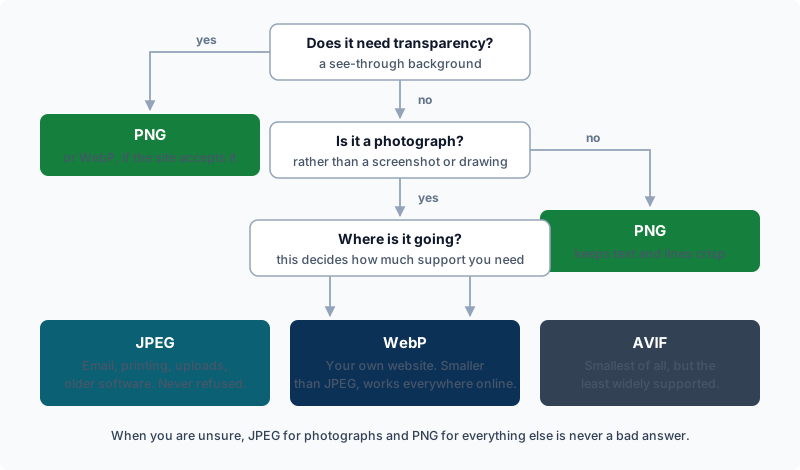
Decision rules
- Is it a photograph? Use JPEG for safety, or WebP if the destination supports it. Consider AVIF only if you have a way to encode it and have checked support.
- Does it need a transparent background? Use PNG or WebP. JPEG will fill the transparent area with a solid colour.
- Is it a screenshot, logo or diagram with text? Use PNG, or lossless WebP, so edges stay clean.
- Is it animated? WebP or AVIF handle animation, but check the file behaves as expected before publishing.
- Is it going into an email, a document, a print job or an old upload form? Use JPEG or PNG. They are accepted almost everywhere.
- Unsure? Export a JPEG and a WebP, compare sizes and look at both at full size.
Converting and compressing in your browser
Synthixx's Image Converter turns one image at a time into PNG, JPEG or WebP, with a quality slider for JPEG and WebP. It also shows an AVIF button, but only when your browser is able to encode AVIF, and most browsers currently cannot. So do not plan a workflow around producing AVIF here; if you need AVIF files, you will need software that specialises in encoding them.
The Image Compressor works the same way with a slightly different aim. You can keep the original format or switch to JPEG or WebP, choose a quality from 10 to 100, and optionally cap the maximum width and height. A PNG kept as PNG stays lossless, so the quality slider does not shrink it; to reduce a PNG, cap its dimensions or change format. Converting to JPEG flattens any transparency onto a white background, so do not use JPEG output for a logo that needs to sit on a coloured page.
Both tools run in your browser and the image is not uploaded. One practical note: WebP encoding depends on the browser, and if a browser cannot produce the requested format the tool reports an error rather than quietly saving something different.
Once the format is settled, size matters too. Why images slow down your website explains how dimensions and file weight affect page speed.
A simple rule of thumb
Photos go to JPEG or WebP, graphics with sharp edges or transparency go to PNG or WebP, and AVIF is an optimisation you add later if you have the tooling and have confirmed support. Keep an untouched original of anything important, because converting between lossy formats repeatedly only degrades the picture.