How many pages fit under 100 KB, 200 KB, 500 KB or 1 MB?
We built test PDFs of 1 to 12 scanned pages and fitted each under five size limits. The table shows what is possible, what one page costs at each resolution, and when a limit is out of reach.
A form asks for a PDF under 200 KB. Your document is five pages. Is that possible? It depends on one number, the budget per page, and most advice online never says what it is. We measured it.
What we measured
We built six test PDFs of 1, 2, 3, 5, 8 and 12 pages. Each page is an A4 scan in the sense that matters for size: printed text on paper-grain noise, saved as a 200-dpi JPEG, with a photo block on the first page. The files are 468 KB, 918 KB, 1.37 MB, 2.27 MB, 3.62 MB and 5.42 MB.
We ran each one through Compress PDF to a Set Size against five limits, 30 runs in all, in a real browser, and wrote down the highest resolution that fitted. The tool tries a lossless rewrite first, then redraws every page as a JPEG at settings from 150 dpi down to a 60 dpi floor, and keeps the best one that fits.
The result
| Pages (original size) | 100 KB | 200 KB | 500 KB | 1 MB | 2 MB |
|---|---|---|---|---|---|
| 1 (468 KB) | 96 dpi | 130 dpi | already under | already under | already under |
| 2 (918 KB) | 60 dpi | 96 dpi | 130 dpi | already under | already under |
| 3 (1.37 MB) | does not fit | 72 dpi | 110 dpi | 150 dpi | already under |
| 5 (2.27 MB) | does not fit | 60 dpi | 96 dpi | 130 dpi | 150 dpi |
| 8 (3.62 MB) | does not fit | does not fit | 72 dpi | 96 dpi | 130 dpi |
| 12 (5.42 MB) | does not fit | does not fit | 60 dpi | 84 dpi | 110 dpi |
"Already under" means the original was smaller than the limit, so it was returned unchanged and its text stays selectable. "Does not fit" means the pages were still over the limit at the 60 dpi floor.
What a page costs
The table follows from a simple cost. One page came to about 36 KB at 60 dpi, 59 KB at 72, 92 KB at 96, 146 KB at 110, 194 KB at 130 and 332 KB at 150, each at the JPEG quality the tool pairs with that resolution.
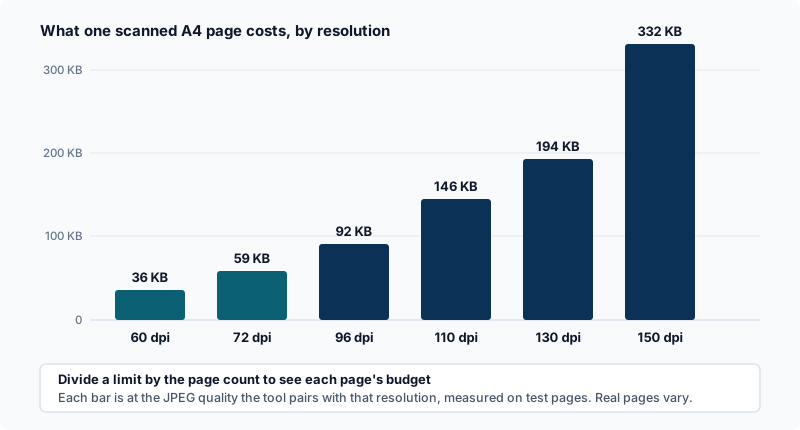
Divide your limit by your page count and see where the budget lands. At the floor the cost was almost constant: 3, 5, 8 and 12 pages came to 36.3, 36.1, 36.0 and 35.9 KB a page. That is why 100 KB holds about two pages, 200 KB about five, 500 KB about thirteen and 1 MB about twenty-seven. Those are ceilings, not targets: they are what is left when every page is at the lowest resolution.
What the lower resolutions look like
We read the test text, set at about 9 points, at 100% zoom. At 96 dpi it was sharp. At 72 dpi it was slightly soft. At 60 dpi it was clearly blurred, though the words stayed legible. Digits and small print are less forgiving than words, so check the numbers that matter, such as ID numbers and dates, in the file you will actually send. The tool warns below 84 dpi and never goes below 60.
Why not convert to black and white?
It is a common suggestion, so we tested it. We built a second set of scans with colour noise, which phone photos have, and compared the smallest result at the floor in colour and in grey. One page came to 37.1 KB in colour and 36.8 KB in grey, and three pages to 108.2 KB and 107.8 KB. That is under 1%. The browser's JPEG encoder already stores colour cheaply at low quality, so removing it saves almost nothing, and the tool does not offer it.
Text PDFs behave the other way
Everything above is about scans. A PDF made by a word processor stores its text as text, which is tiny, and redrawing it as pictures makes it larger, not smaller. A 30-page text PDF we built was 43.8 KB. Asked for 20 KB, the tool tried, found that a redraw would be larger than the file it was given, returned the original and said so. If your PDF is text, check its size before doing anything: it may already be under the limit.
When the limit is out of reach
If the pages cost more than the limit allows even at the floor, no setting will give a person something readable. What remains is fewer pages, with Delete PDF Pages or Extract PDF Pages; a split into parts that each fit, with Split PDF; or a higher limit. Whether a form will accept a bigger file is a question for whoever runs the form, and one we cannot answer from here.
How far to trust these numbers
These are test pages, not your document. A mostly blank page costs less than a full one, and a page with a large photograph costs more. We used one browser on one computer, so the timings are indicative: 3 pages took about 8 seconds, 8 pages about 15, and 12 pages 40 to 60 seconds, and a phone will be slower.
The pattern should hold on other devices. The number of pixels falls with the square of the resolution, and the JPEG quality the tool pairs with each step falls too, which is why a page costs about nine times as much at 150 dpi as at 60.
Try it
Pick the limit your form gives: 100 KB, 200 KB, 500 KB, 1 MB, 2 MB, or any size. If your file is a photograph rather than a document, Compress Image to KB does the same job for pictures.